Your Webhook Endpoint Is a Tiny Distributed System
A webhook starts as one HTTP endpoint. Making it trustworthy, durable, retryable, and safe under concurrency turns it into something much more interesting.
A webhook starts as one HTTP endpoint. Making it trustworthy, durable, retryable, and safe under concurrency turns it into something much more interesting.
What two fresh coding-agent sessions revealed about an agent-friendly Rails starter.
Learn how to spot and fix N+1 query problems in your Rails app with practical examples, tools, and simple performance tips.
An update to How to Build a Twitter Clone with Rails and React
Tips for the new Rails 8 Authentication Generator
Morphs, Presence, and Typing Indicators
Using the Rails browser console in a safe way
An update to How to Build a Twitter Clone with Rails and Hotwire
Quick tutorial to get time zones across the stack
Hotwire is fresh out of the Basecamp Github and has set the Rails community ablaze. This quick write up is an update from How to Build a Twitter Clone with rails, ActionCable, and React to show a comparison between the two approaches.
Now, this doesn’t mean to throw away any React code you may be using or StimulusReflex if you have already gone down that path. Those approaches are both more mature and widely discoverable.
I may follow this up with a video to do a more side-by-side look at these two approaches.
Without further ado, let’s get started with a new app:
rails new blabber --no-springRails will do its thing, install the application, install the gems, process the Webpacker install, and install the NPM packages.
Next, we will want to add the hotwire-rails gem to get the libraries needed:
gem "hotwire-rails", "~> 0.1.1"Bundle and run the installer command for Hotwire:
bundle installrails hotwire:installNow, let’s make a model to hold the data to clone a tweet in this Twitter clone called Blabber. All basic attributes:
rails g model Post username body:text likes_count:integer repost_count:integerTo keep this closely resembling the CableReady/StimulusReflex/React article, we’ll add the same validation in the Post model:
class Post < ApplicationRecord  after_create_commit { broadcast_prepend_later_to 'posts' }  after_update_commit { broadcast_replace_later_to 'posts' }  after_destroy_commit { broadcast_remove_to 'posts' }
  validates :body, length: { minimum: 1, maximum: 280 }end
One difference you see is the callbacks. When using Hotwire, the prevailing convention is to use ActiveRecord callbacks. While working on the model collection, you can set up callbacks for create, update, and destroy broadcasts.
We’ll make a few small adjustments to the generated migration file to add some database-level defaults (and allows us to keep the code around Post creation simple):
class CreatePosts < ActiveRecord::Migration[6.0]  def change    create_table :posts do |t|      t.string :username, default: 'Blabby'      t.text :body      t.integer :likes_count, default: 0      t.integer :repost_count, default: 0
      t.timestamps    end  endend
Ok! Now, we’re ready to run that migration!
rails db:migrateWith the Model and Database layer out of the way, we can move on to the controller and corresponding view templates!
def index  @posts = Post.all.order(created_at: :desc)  @post = Post.newend
def create  @post = Post.new(post_params)  respond_to do |format|    if @post.save      format.html { redirect_to posts_path }    else      format.html { render :index }      format.turbo_stream { render turbo_stream: turbo_stream.replace(@post, partial: 'posts/form', locals: { post: @post }) } ## New for this article    end  endend
def like  Post.find_by(id: params[:post_id]).increment(:likes_count).save ## New for this article  redirect_to posts_pathend
def repost  Post.find_by(id: params[:post_id]).increment(:repost_count).save ## New for this article  redirect_to posts_pathend
private
def post_params  params.require(:post).permit(:body)end
Simple controller. The index action returns a list of posts to @post. create uses StrongParameters, creates a new Post, and addresses some Turbo::Stream usage (more on that soon), and redirects back to the index template. like and repost are similar except they increment the respective count columns.
Let’s wire up a few routes to match up to those controller actions. Yes, these aren’t perfect RESTful routes, but 1) They work. 2) This is a 10-minute tutorial. 3) Are GET requests making sure we do not have to worry about AJAX/fetch/CSRF in the front-end. You would work around these issues in a production application.
Rails.application.routes.draw do  resources :posts, only: %i[index create] do    get 'like'    get 'repost'  end
  root to: 'posts#index'end
With a Model, Controller, and routes, we can put together some view templates. We’ll start by adding Bootstrap CDN CSS. This way, we can wire up some UI interfaces pretty quickly!
<!DOCTYPE html><html>  <head>    <title>Blabber</title>    <%= csrf_meta_tags %>    <%= csp_meta_tag %>
    <%= stylesheet_link_tag 'application', media: 'all', 'data-turbolinks-track': 'reload' %>    <link href="https://stackpath.bootstrapcdn.com/bootstrap/4.4.1/css/bootstrap.min.css" rel="stylesheet" integrity="sha384-Vkoo8x4CGsO3+Hhxv8T/Q5PaXtkKtu6ug5TOeNV6gBiFeWPGFN9MuhOf23Q9Ifjh" crossorigin="anonymous">    <%= yield :head %>    <%= turbo_include_tags %>    <%= stimulus_include_tags %>  </head>
  <body>    <%= yield %>  </body></html>
The yield :head, turbo_include_tags, and stimulus_include_tags were all added earlier by the hotwire:install command.
The first view template up is the app/views/posts/index.html.erb:
<div class="container">  <h1>Blabber</h1>  <h4>A Rails, Hotwire demo</h4>
  <%= turbo_frame_tag 'post_form' do %>    <%= render partial: 'form' %>  <% end %>
  <%= turbo_stream_from :posts %>  <%= turbo_frame_tag 'posts' do %>      <%= render @posts %>  <% end %></div>
The view is a relatively simple usage of Rails, with a render @posts method, rendering the collection of @posts, using a posts/_post partial. The turbo_frame_tag’s will allow the Turbo libraries to instantiate the “frames” that will manage the HTML partials sent over the wire from the broadcasted changes. A lot is going on with that process, but Hotwire and Rails are taking care of it all and merely managing the markup. Specifically, turbo_stream_from :posts hooks up the view layer to listen to the Post model’s broadcasts.
The partial is some pretty standard singular object markup with some Bootstrap classes thrown in to make it look half decent:
app/views/posts/_posts.html.erb
<%= turbo_stream_from post %><div class="card mb-2" id="<%= dom_id(post) %>"> <div class="card-body"> <h5 class="card-title text-muted"> <small class="float-right"> Posted at <%= post.created_at %> </small> <%= post.username %> </h5> <div class="card-text lead mb-2"><%= post.body %></div> <a class="card-link" href="<%= post_repost_path(post) %>"> Repost (<%= post.repost_count %>) </a> <a class="card-link" href="<%= post_like_path(post) %>"> Likes (<%= post.likes_count %>) </a> </div></div>Another turbo_stream command to listen for broadcasted updates and deletions, and the dom_id helper to create conventional Rails View IDs model_resource-id. In this case, it would look like posts_1, etc.
Up next is a straightforward Rails form:
<%= form_with model: @post, id: dom_id(@post), html: {class: 'my-4' } do |f| %><% if @post.errors.any? %><div id="error_explanation">  <h2>    <%= pluralize(@post.errors.count, "error") %> prohibited this post from    being saved:  </h2>
  <ul>    <% @post.errors.full_messages.each do |msg| %>    <li><%= msg %></li>    <% end %>  </ul></div><% end %><div class="form-group">  <%= f.text_area :body, placeholder: 'Enter your blab', class: 'form-control',  rows: 3 %></div>
<div class="actions">  <%= f.submit class: "btn btn-primary" %></div><% end %>
If you remember the index.html.erb, another frame wrapped the form’s render call. Thus we included the dom_id to allow the controller’s create action to enable Turbo to manage the streams’ markup.
Now we’ll head back to the controller to talk about the create action in depth:
def create @post = Post.new(post_params) respond_to do |format| if @post.save format.html { redirect_to posts_path } else format.html { render :index } format.turbo_stream { render turbo_stream: turbo_stream.replace(@post, partial: 'posts/form', locals: { post: @post }) } end endendOn a failed save, it will instruct the form’s partial to update the form frame with the form template, but this time with the errors markup triggered.
At this point, it should look like this!
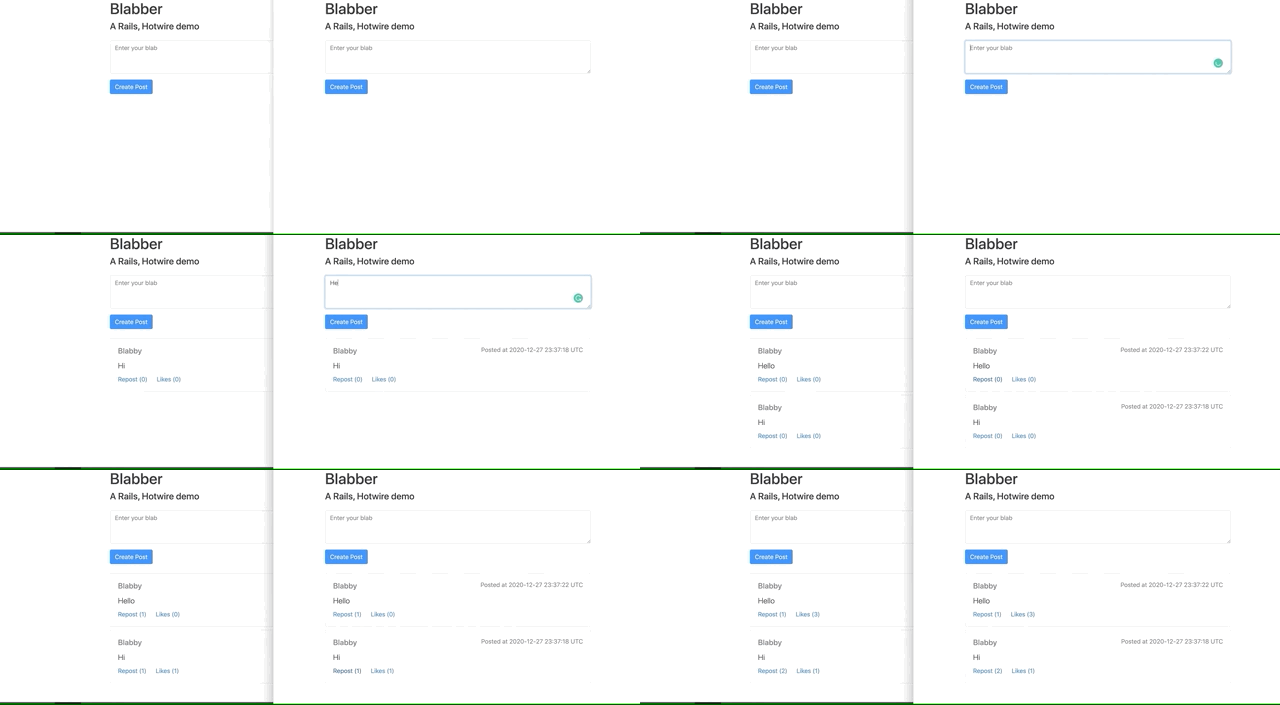
There you go! I bet with a fast enough system to work through the Rails install, gem install, and javascript package installs, you could make it through this tutorial in less than 10 minutes!
An update to How to Build a Twitter Clone with rails, ActionCable, and React
Adding Bootstrap 4 and how to use a theme
19 Must-Have Gems for 2020
A response to building a Twitter clone with Rails, CableReady, and StimulusReflex
Rails and PostgreSQL